
End Device Activation
In this lesson, you will learn about the device activation process in a LoRaWAN network. After reading this, you will be able to understand:
To activate an end device with a LoRaWAN network, you need to have a LoRaWAN network server. A LoRaWAN network server is a piece of software runs on cloud, SaaS or on-permises. Some of the popular network servers are The Things Stack and the ChripStack.
The Things Stack can be
In LoRaWAN, device activation is the process used to register a new end device within a LoRaWAN network. All Dragino end devices ([link to end device products landing page]) support both ABP and OTAA activation methods.
There are two device acivation methods available.
- OTAA (Over-the-Air Activation)
- APB (Activation by Personalization)
Tips
We recommend you to use the OTAA to securely activate your end devices with a LoRaWAN network. It also enables your end devices to securely communicate with the LoRaWAN network server.
before understand how activation works, you should familier with identifires and cryptograpic keys used in the activation.
Identifires
These identifires are stored in the end device efore the activation procedure is executed.
DevEUI
Each end device is assigned a 64-bit globally unique identifier called DevEUI. The DevEUI is provisioned on the end device. The following figure shows the DevEUI assigned to one of the Dragino end devices. A DevEUI looks something like this: 70B3D57ED005A1C2
AppEUI
The AppEUI is a globally unique identifier that uniquely identifies the entity able to process the JoinReq frame. The AppEUI is stored on the end device.
Cryptographic keys
LoRaWAN uses two cryptographic algorithms:
- AES-CMAC - is used for origin authentication and integrity protection
- AES-CCM - is used for encryption
Root keys
Root keys are used to derive session keys. In LoRaWAN v1.0.x, a unique root key is provisioned on both the end device and the network side, which is located on the Join Server. This is a 128-bit long cryptographic key.
OTAA
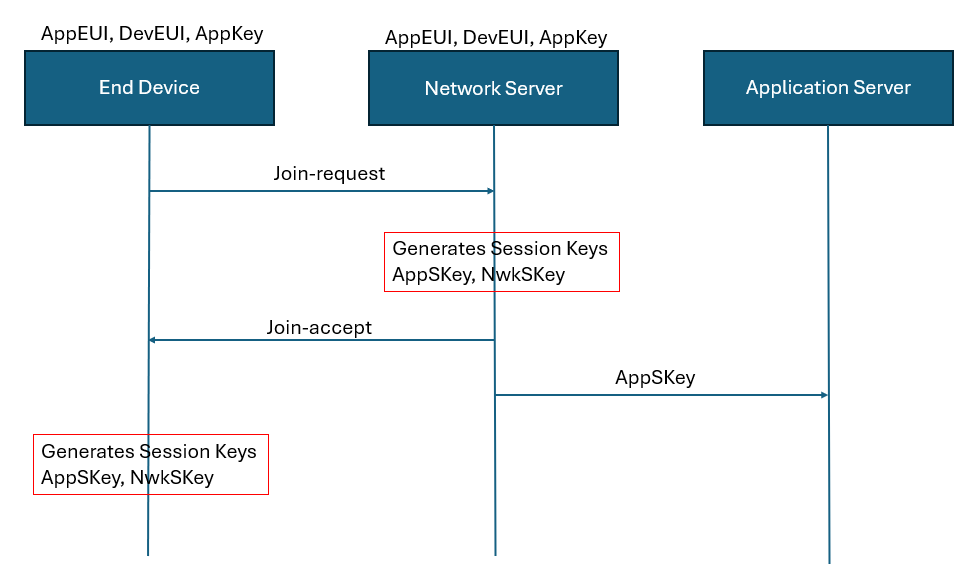
LoRaWAN v1.0.x uses a single root key, called the AppKey, to generate the session keys. The message flow chart and steps below explain how a device is activated with a generic LoRaWAN Network Server.
1: Sending the Join-request message
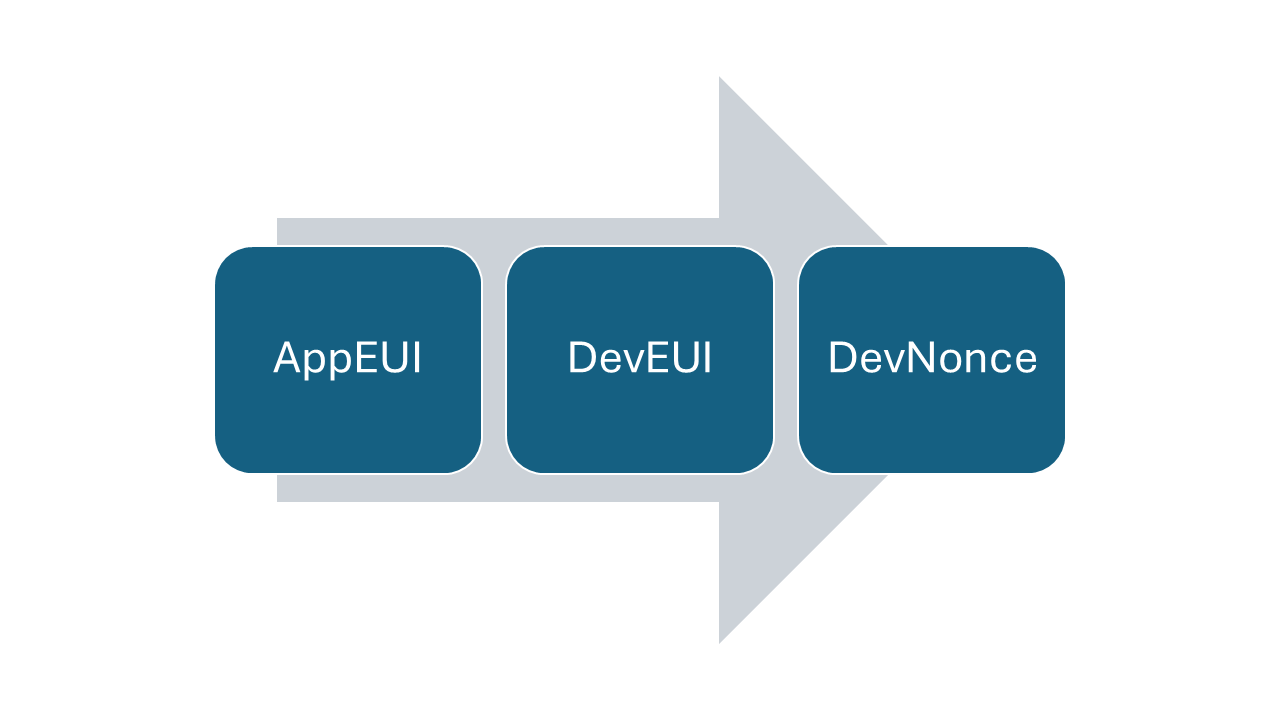
When you power on an end device (for some of our devices you need to press the ACT button) the join procedure begins. The end device transmits a Join request message. This message will receive by a LoRaWAN gatewy and then forwards to the LoRaWAN network server. The Join request message consists of three fields:
2: Generating session keys
The Network Server processes the Join-request message. If the end device is allowed to join the network, the network server generates two session keys, AppSKey and NwkSKey using the AppKey and the Join-accept message.
3: Sending Join-accept message to the end device
The Network Server sends the encrypted Join-accept message back to the end device as a normal downlink.
4: Network Server destibutes the AppSKey
The Network Server keeps the NwkSKey and distributes the AppSKey to the Application Server.
5: End device generates session keys
The end device decrypts the join-accept message and generates two session keys: AppSKey and NwkSKey. The join-accept message also includes the DevAddr, which is assigned by the network server to the device. After generating the session keys, the end device permanetly stores the follwing on its non-volatile memory.
- AppSkey
- NwkSKey
- DevAddr